<?xml version="1.0" encoding="utf-8"?>
<feed xmlns="http://www.w3.org/2005/Atom">
    <id>https://support-test.innobrix.net/en/news</id>
    <title>Innobrix Support Blog</title>
    <updated>2025-03-25T09:24:32.000Z</updated>
    <generator>https://github.com/jpmonette/feed</generator>
    <link rel="alternate" href="https://support-test.innobrix.net/en/news"/>
    <subtitle>Innobrix Support Blog</subtitle>
    <icon>https://support-test.innobrix.net/en/img/favicon.ico</icon>
    <entry>
        <title type="html"><![CDATA[Release Notes 6.13]]></title>
        <id>https://support-test.innobrix.net/en/news/release-notes-613</id>
        <link href="https://support-test.innobrix.net/en/news/release-notes-613"/>
        <updated>2025-03-25T09:24:32.000Z</updated>
        <summary type="html"><![CDATA[Innobrix Update v6.13]]></summary>
        <content type="html"><![CDATA[<h3 class="anchor anchorTargetStickyNavbar_Vzrq" id="innobrix-update-v613">Innobrix Update v6.13<a href="https://support-test.innobrix.net/en/news/release-notes-613#innobrix-update-v613" class="hash-link" aria-label="Direct link naar Innobrix Update v6.13" title="Direct link naar Innobrix Update v6.13" translate="no">​</a></h3>
<p>De Innobrix-crew heeft hard gewerkt om een prachtige release mogelijk te maken. In de meest recente release van 18 maart 2025 hebben wij enkele nieuwe features geïntroduceerd.</p>
<h4 class="anchor anchorTargetStickyNavbar_Vzrq" id="features--verbeteringen">Features &amp; Verbeteringen<a href="https://support-test.innobrix.net/en/news/release-notes-613#features--verbeteringen" class="hash-link" aria-label="Direct link naar Features &amp; Verbeteringen" title="Direct link naar Features &amp; Verbeteringen" translate="no">​</a></h4>
<ul>
<li class=""><strong>Optionele UI onderdelen voor de Viewer</strong>.<!-- -->
<ul>
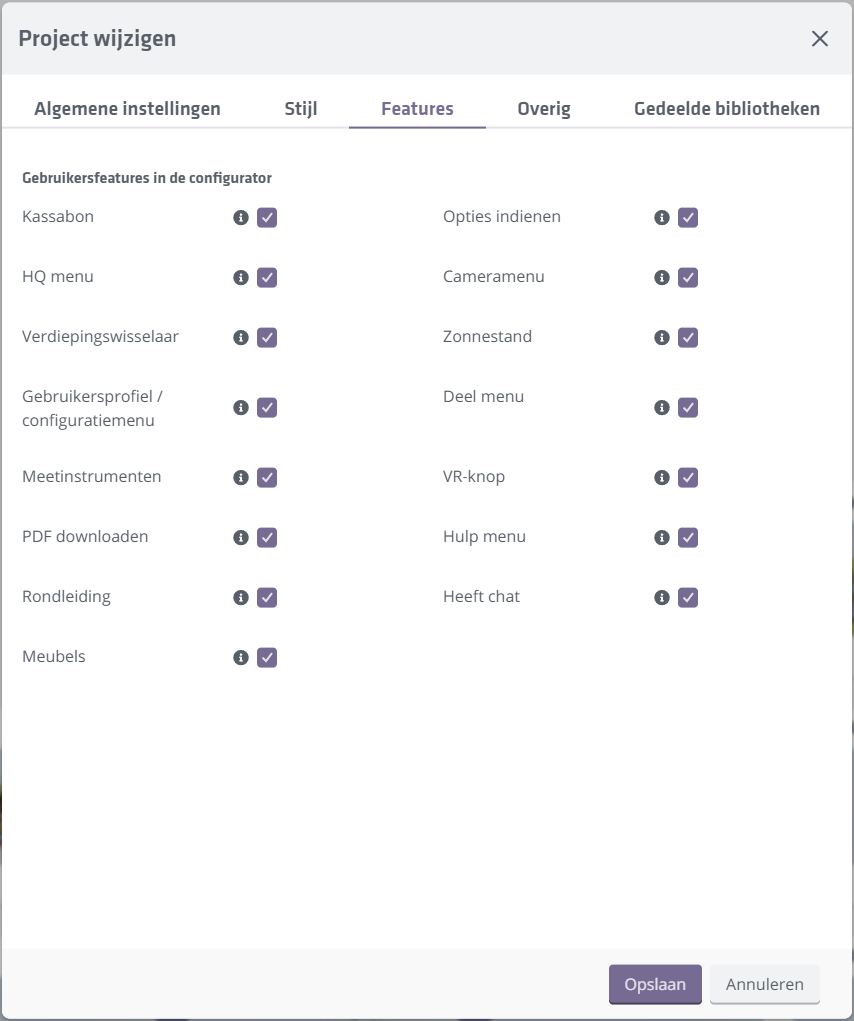
<li class="">Het is nu mogelijk om alle features van de Innobrix Viewer aan of uit te zetten. Dit kan worden gedaan binnen het 'Wijzig Project' scherm, of tijdens het aanmaken van een project.</li>
</ul>
</li>
</ul>
<p><img decoding="async" loading="lazy" alt="Optional UI" src="https://support-test.innobrix.net/en/assets/images/optional-ui-viewer-585f54c7fff1c5dae7c492992fb75040.jpg" width="854" height="1021" class="img_ev3q"></p>
<ul>
<li class="">
<p><strong>Ondersteuning voor het FBX en GLB bestandsformaat</strong>.</p>
<ul>
<li class="">Deze bestandstypen kunnen (vooralsnog 😉) enkel in de  <code>Modellen</code> of <code>Terreinen</code> bibliotheek worden geïmporteerd.</li>
</ul>
</li>
<li class="">
<p><strong>Een <code>SmartLOD</code>-systeem ter verbetering van de prestaties en laadtijden van de configurator</strong>.</p>
<ul>
<li class="">Het is nu mogelijk om <code>Kolommen</code> (en dus alle groepen binnen één kolom) uit te schakelen in 'wijk' of 'plan' view. Dat betekent dat deze groepen pas worden ingeladen wanneer men een Woning selecteert in de Viewer, en niet eerder dan dat. Om maximaal van deze feature gebruik te maken (en de gebruikerservaring voor je bezoekers te verbeteren) wil je doorgaans alle kolommen uitschakelen die groepen bevatten die niet zichtbaar zijn aan de buitenzijde van de woning. (Hoewel je misschien een uitzondering kan maken voor vorstvrije buitenkranen...😒)</li>
<li class="">Deze feature is enkel op Configurables van toepassing en kan dan ook enkel worden ingesteld in de <code>Configurable-Editor</code>.</li>
<li class="">Kolommen worden nu in een parent object genaamd 'Components' gegroepeerd voor beter overzicht.</li>
</ul>
</li>
<li class="">
<p><strong>Compleet herschreven en verbeterde <em>Model en IBX Processing Pipeline</em></strong>.</p>
<ul>
<li class="">Verbeterde <em>Model Group</em> handling</li>
<li class="">Verbeterde memory handling</li>
<li class="">Verbeterde verwerkingssnelheid (tot 200% verbetering op grotere modellen die veel groepen bevatten)</li>
<li class="">Ondersteuning voor ge-embedde texturen (inc. bump of normal maps) voor GLB's die in <em>Decoraties</em> worden geupload.</li>
<li class="">Verbeteringen die moeten voorkomen dat een Model processing job niet van start gaat.</li>
<li class="">Geometrie die niet voorzien is van een materiaal wordt nu automatisch voorzien van het <em>'INNOBRIX_DEFAULT_MATERIAL'</em> materiaal.</li>
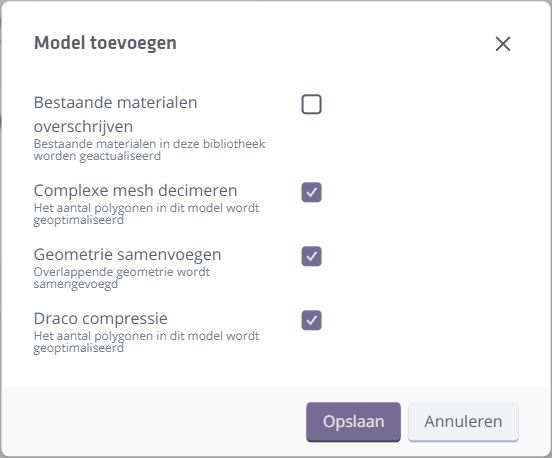
<li class="">Model verwerkings-opties: Optionele <em>decimation</em>, <em>mesh samenvoegen</em> en <em>(DRACO) compressie</em>.</li>
</ul>
</li>
</ul>
<div style="display:flex;justify-content:center;margin-bottom:2rem"><img decoding="async" loading="lazy" alt="Optimise" src="https://support-test.innobrix.net/en/assets/images/optimize-options-305e627ecba775f67bd219c31668e4d4.jpg" width="552" height="458" class="img_ev3q"></div>
<ul>
<li class=""><strong>PDF module is verbeterd</strong>.<!-- -->
<ul>
<li class="">De PDF wordt aanzienlijk sneller gegenereerd.</li>
<li class="">Correcte verdiepingsnamen worden toegepast.</li>
<li class="">Aanwezige optie-codes worden nu ook in de PDF getoond.</li>
<li class="">Er wordt standaard voor de top-down camera geclipped op 150cm hoogte vanaf elke verdiepingsvloer.</li>
<li class="">Hogere resolutie voor elke screenshot waardoor de afbeelding scherper is.</li>
</ul>
</li>
</ul>
<h4 class="anchor anchorTargetStickyNavbar_Vzrq" id="bugfixes">Bugfixes<a href="https://support-test.innobrix.net/en/news/release-notes-613#bugfixes" class="hash-link" aria-label="Direct link naar Bugfixes" title="Direct link naar Bugfixes" translate="no">​</a></h4>
<ul>
<li class="">Een issue waarbij Ambient Occlusion haast niet zichbaar is wanneer er ingezoomd is.</li>
<li class="">Configurable thumbnail die nooit wordt geupdated; dit gebeurt nu bij het inladen van de Configurable-Editor.</li>
<li class="">Aanpassingen aan de Configurable (zoals het aanmerken van een 'standaard' groep) die niet rechtstreeks zichtbaar waren in de ingeklapte 3D view.</li>
<li class="">Planconfigurator stap 2 stond het wisselen van camera positie niet toe.</li>
<li class="">Een issue met de vertaling in sommige webbrowsers die een 400 foutmelding veroorzaakte.</li>
<li class="">Een issue waarbij het dupliceren van een planconfigurator plan geen eventuele 'verwijderingen' kopieerde.</li>
<li class="">Een issue waarbij de Verdiepingswisselaar de schaduwen op de modellen niet worden geupdated.</li>
<li class="">Een issue waarbij de texture drag en drop niet goed werkte wanneer de Verdiepingswisselaar actief was.</li>
<li class="">Een Company Manager kan nu eigen geuploadde decoraties en massa volumes correct verwijderen</li>
<li class="">Een issue waarbij de Scene hierarchy niet de volledige naam van een optielijst toonde binnen de Configurable-Editor.</li>
<li class="">Een issue waarbij de Scene hierarchy in een plan incorrect 'Configurable' aangaf als het een 'Model' was.</li>
<li class="">Binnen de planconfigurator functioneerde de 'default' verdieping die getoond moest worden niet correct.</li>
</ul>]]></content>
        <author>
            <name>Paul Dijkstra</name>
            <uri>https://innobrix.net</uri>
        </author>
        <category label="updates" term="updates"/>
    </entry>
    <entry>
        <title type="html"><![CDATA[Release Notes 6.9]]></title>
        <id>https://support-test.innobrix.net/en/news/release-notes-69</id>
        <link href="https://support-test.innobrix.net/en/news/release-notes-69"/>
        <updated>2024-05-30T11:14:46.000Z</updated>
        <summary type="html"><![CDATA[Innobrix Update v6.9]]></summary>
        <content type="html"><![CDATA[<h3 class="anchor anchorTargetStickyNavbar_Vzrq" id="innobrix-update-v69">Innobrix Update v6.9<a href="https://support-test.innobrix.net/en/news/release-notes-69#innobrix-update-v69" class="hash-link" aria-label="Direct link naar Innobrix Update v6.9" title="Direct link naar Innobrix Update v6.9" translate="no">​</a></h3>
<p>De Innobrix-crew heeft hard gewerkt om een prachtige release mogelijk te maken. In de meest recente release van 16 mei 2024 hebben wij enkele nieuwe features geïntroduceerd.</p>
<h4 class="anchor anchorTargetStickyNavbar_Vzrq" id="features--verbeteringen">Features &amp; Verbeteringen<a href="https://support-test.innobrix.net/en/news/release-notes-69#features--verbeteringen" class="hash-link" aria-label="Direct link naar Features &amp; Verbeteringen" title="Direct link naar Features &amp; Verbeteringen" translate="no">​</a></h4>
<ul>
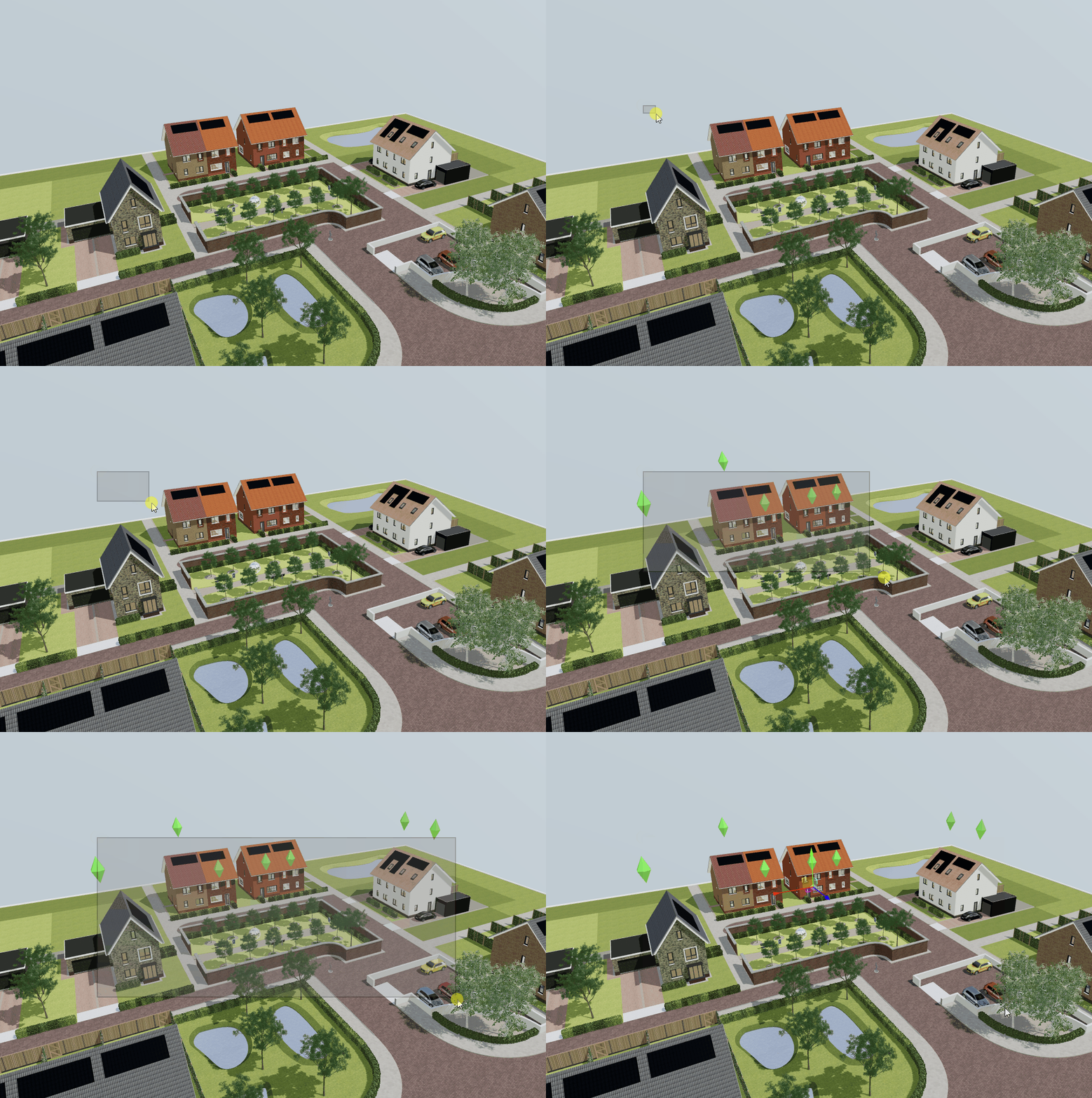
<li class="">Introductie van de nieuwe <em><strong>Box Select</strong></em> functionaliteit. Hiermee ben je in staat meerdere Woningen tegelijkertijd te selecteren zonder dat je de Woningen één voor één hoeft aan te klikken tijdens het inhouden van de <kbd>CTRL</kbd> toets. In plaats daarvan kun je de <kbd>CTRL</kbd> toets inhouden en vervolgens met je muis klikken <em>en slepen</em> om een kader te trekken waarbij alle Woningen die binnen het kader vallen worden geselecteerd.</li>
</ul>
<p><img decoding="async" loading="lazy" alt="Box Select" src="https://support-test.innobrix.net/en/assets/images/box-select-bc1136648653a269924a043e96ec2d34.gif" width="1038" height="696" class="img_ev3q"></p>
<ul>
<li class="">Het oude 'Standaarden bewerken' menu is verdwenen en is vervangen door dezelfde (vorm van) optielijst die door eindgebruikers wordt ervaren in de Innobrix Viewer. Vergelijkbaar met de Viewer, kun je hier al vooraf opties aan- en uitzetten, voor je eindgebruikers.</li>
<li class="">Binnen de Configurable-Editor wordt het nieuwe optielijst menu nu ook gebruikt zodat je je logica ook kan testen.</li>
<li class="">Aanvullend op de bovenstaande <em>Box-Select</em> feature hebben wij aanvullend het <em><strong>Multi-Configuratie</strong></em> systeem geïntroduceerd waarbij er meerdere Woningen tegelijkertijd in de Plan-Editor van de Woning- en Planconfigurator kunnen worden geconfigureerd.</li>
<li class="">Een wachtrij systeem voor het uploaden van Modellen en Configurables. Hierdoor hebben wij diverse optimalisaties kunnen doorvoeren aan het verwerken van modellen tijdens het verwerken van een IBX-bestand. Dit verkort de verwerkingstijd van IBX-bestanden aanzienlijk. Dit is met name merkbaar bij grotere en gedetailleerde modellen.</li>
</ul>]]></content>
        <author>
            <name>Paul Dijkstra</name>
            <uri>https://innobrix.net</uri>
        </author>
        <category label="updates" term="updates"/>
    </entry>
    <entry>
        <title type="html"><![CDATA[Release Notes 6.8]]></title>
        <id>https://support-test.innobrix.net/en/news/release-notes-68</id>
        <link href="https://support-test.innobrix.net/en/news/release-notes-68"/>
        <updated>2024-03-28T12:41:52.000Z</updated>
        <summary type="html"><![CDATA[Innobrix Update v6.8]]></summary>
        <content type="html"><![CDATA[<h3 class="anchor anchorTargetStickyNavbar_Vzrq" id="innobrix-update-v68">Innobrix Update v6.8<a href="https://support-test.innobrix.net/en/news/release-notes-68#innobrix-update-v68" class="hash-link" aria-label="Direct link naar Innobrix Update v6.8" title="Direct link naar Innobrix Update v6.8" translate="no">​</a></h3>
<p>De Innobrix-crew heeft hard gewerkt om een prachtige release mogelijk te maken. In de meest recente release van 26 maart 2024 hebben wij enkele nieuwe features geïntroduceerd.</p>
<h4 class="anchor anchorTargetStickyNavbar_Vzrq" id="features">Features<a href="https://support-test.innobrix.net/en/news/release-notes-68#features" class="hash-link" aria-label="Direct link naar Features" title="Direct link naar Features" translate="no">​</a></h4>
<ul>
<li class="">Het nieuwe <a class="" href="https://support-test.innobrix.net/en/docs/documentation/Overig/credits-slots">Credits &amp; Slots systeem</a>. Klik op de link voor meer informatie.</li>
<li class="">Introductie van de <code>Modellen</code> bibliotheek waar modellen zonder opties (ten behoeve van de BIM Publisher) kunnen worden geïmporteerd. Importeren gebeurt dus niet langer rechtstreeks in het project.</li>
<li class="">Een trial-pagina waar Innobrix voor niet-klanten geprobeerd kan worden voor 14 dagen.</li>
<li class="">De achterkant van het systeem is herschreven zodat modules (zoals de BIM Publisher en Planconfigurator) apart voor elkaar kunnen worden ingezet.</li>
</ul>
<p>...En een hele hoop fixes en kleine verbeteringen! 😊</p>]]></content>
        <author>
            <name>Paul Dijkstra</name>
            <uri>https://innobrix.net</uri>
        </author>
        <category label="updates" term="updates"/>
    </entry>
    <entry>
        <title type="html"><![CDATA[Release Notes]]></title>
        <id>https://support-test.innobrix.net/en/news/release-notes</id>
        <link href="https://support-test.innobrix.net/en/news/release-notes"/>
        <updated>2023-11-28T12:33:12.000Z</updated>
        <summary type="html"><![CDATA[Innobrix Update v6.6]]></summary>
        <content type="html"><![CDATA[<h3 class="anchor anchorTargetStickyNavbar_Vzrq" id="innobrix-update-v66">Innobrix Update v6.6<a href="https://support-test.innobrix.net/en/news/release-notes#innobrix-update-v66" class="hash-link" aria-label="Direct link naar Innobrix Update v6.6" title="Direct link naar Innobrix Update v6.6" translate="no">​</a></h3>
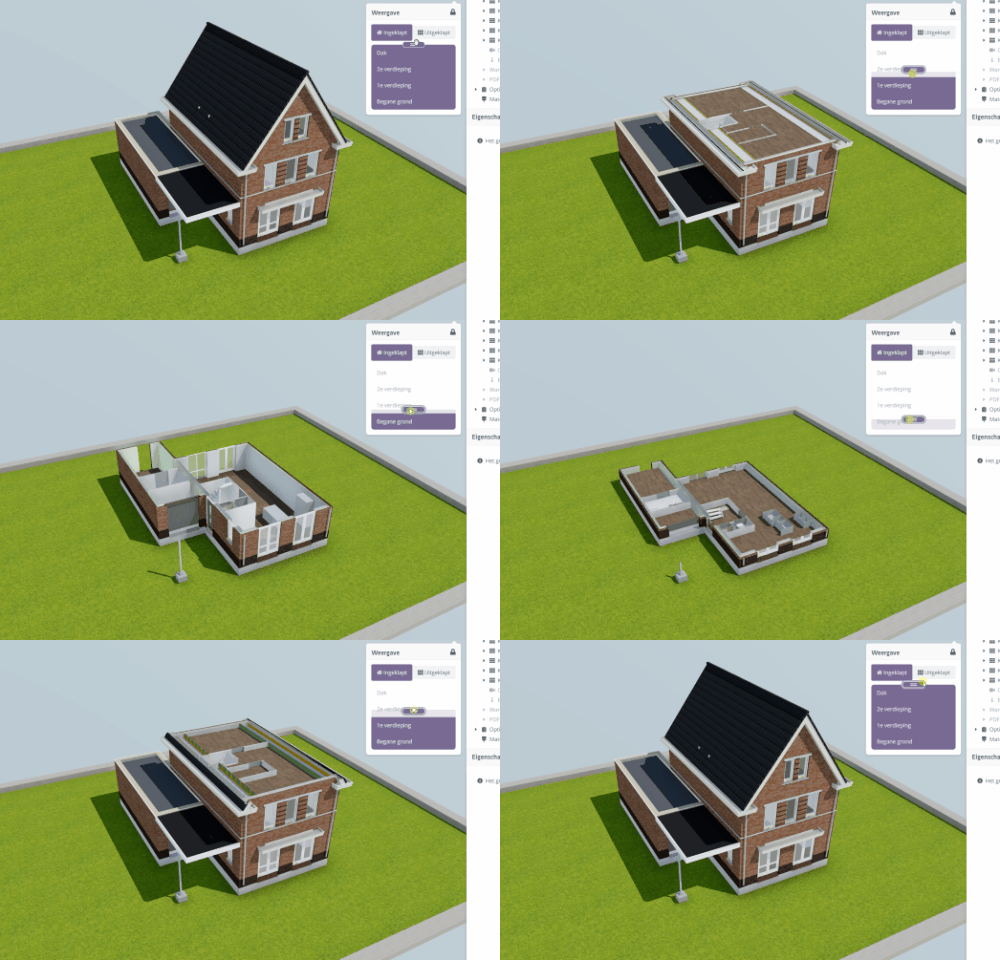
<p>The Innobrix crew has been working hard to enable a fabulous release. Through clever use of a so-called <code>Clipping Shader</code>, we have
we have now made it possible to 'split' a home within Innobrix itself. But there is more...</p>
<h4 class="anchor anchorTargetStickyNavbar_Vzrq" id="changes">Changes<a href="https://support-test.innobrix.net/en/news/release-notes#changes" class="hash-link" aria-label="Direct link naar Changes" title="Direct link naar Changes" translate="no">​</a></h4>
<p><img decoding="async" loading="lazy" alt="Clipping Shader" src="https://support-test.innobrix.net/en/assets/images/Clipping-Shader-10a2883fc6776960611853ab131058e6.gif" width="500" height="320" class="img_ev3q"></p>
<h5 class="anchor anchorTargetStickyNavbar_Vzrq" id="innobrix-add-in-for-revit-200">Innobrix Add-in for Revit (2.0.0)<a href="https://support-test.innobrix.net/en/news/release-notes#innobrix-add-in-for-revit-200" class="hash-link" aria-label="Direct link naar Innobrix Add-in for Revit (2.0.0)" title="Direct link naar Innobrix Add-in for Revit (2.0.0)" translate="no">​</a></h5>
<ul>
<li class="">The <code>Innobrix: Floor</code> parameter is no longer used (and injected) as of this release. As clipping of elements is now done in Innobrix, the
the need to split elements by floor is no longer present. This provides a potential efficiency improvement because, in principle, fewer
columns will be needed to accommodate all groups.<!-- -->
<ul>
<li class="">In this new style export, it is therefore only necessary to use <code>Model Groups</code> for models with options (which can only be used
within the <code>Home Configurator</code> and <code>Plan Configurator</code>). The <code>Model Groups</code> then only need to be provided with a <code>Type(s)</code>, <code>Column</code> and <code>Row</code>.</li>
<li class="">All other principles regarding <code>Model Groups</code> (such as zero points) remain the same for the rest.</li>
</ul>
</li>
</ul>
<div class="theme-admonition theme-admonition-info admonition_xJq3 alert alert--info"><div class="admonitionHeading_Gvgb"><span class="admonitionIcon_Rf37"><svg viewBox="0 0 14 16"><path fill-rule="evenodd" d="M7 2.3c3.14 0 5.7 2.56 5.7 5.7s-2.56 5.7-5.7 5.7A5.71 5.71 0 0 1 1.3 8c0-3.14 2.56-5.7 5.7-5.7zM7 1C3.14 1 0 4.14 0 8s3.14 7 7 7 7-3.14 7-7-3.14-7-7-7zm1 3H6v5h2V4zm0 6H6v2h2v-2z"></path></svg></span>Support for older models</div><div class="admonitionContent_BuS1"><p>It remains possible in the new release to work with pre-existing models that (still) use the <code>Innobrix: Floor</code> parameter.
When opening the document, the add-in checks whether this parameter is present, and based on that, an old or new style export is done
when <code>Export with options</code> is chosen. The <code>Export without options</code> button always works on the new method.</p></div></div>
<ul>
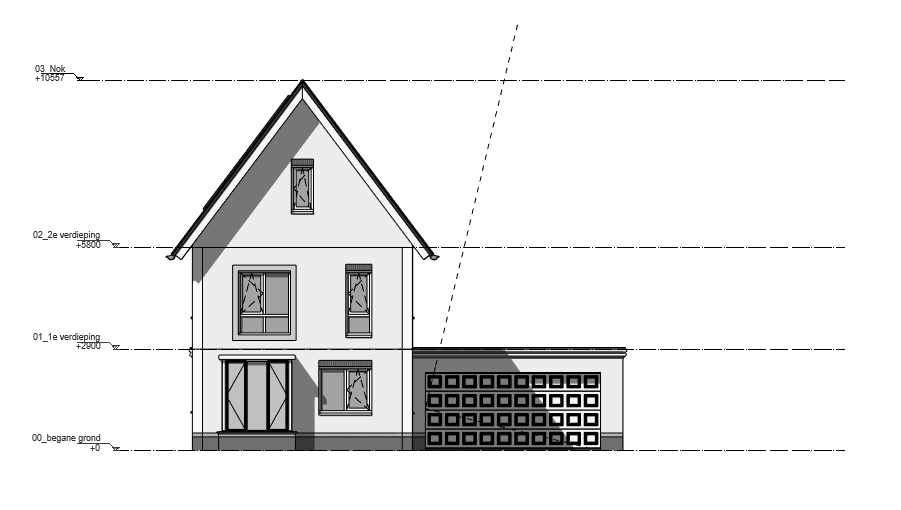
<li class="">Revit Levels designated as <code>Building Story</code> are co-exported to Innobrix to define certain levels in advance.
These levels are modifiable (to a limited extent) in Innobrix or can be disabled if desired.</li>
</ul>
<p><img decoding="async" loading="lazy" alt="Revit Levels" src="https://support-test.innobrix.net/en/assets/images/Vooraanzicht_Levels-076020edff6527b7f80115ec3918b2ce.png" width="901" height="510" class="img_ev3q"></p>
<ul>
<li class="">An additional button has been added in the Innobrix add-in called <code>Export without options</code>. This button is specifically intended to enable a 'quick' export
towards the <code>BIM Publisher</code> or even the <code>Planconfigurator</code> if no options are available or necessary.<!-- -->
<ul>
<li class="">During the export, all <em>visible</em> geometric elements are included in the current 3D view. <strong>For an export to the <code>BIM Publisher</code>
therefore no longer have to stick to <code>Model Groups</code>.</strong></li>
<li class="">Elements that are always skipped during an export are direct <code>Model Text</code> elements (which are therefore not nested in a family) and
<code>RPC</code> elements (render proxies).</li>
</ul>
</li>
<li class="">The IBX exporter has been completely rewritten so that almost no elements (such as nested voids) are left in the wrong place.</li>
<li class="">Support for <code>Linked</code>-Revit files has been added to the exporter. (Importing back into Revit based on linked Revit files does not yet work).</li>
</ul>
<h5 class="anchor anchorTargetStickyNavbar_Vzrq" id="innobrix-studio">Innobrix Studio<a href="https://support-test.innobrix.net/en/news/release-notes#innobrix-studio" class="hash-link" aria-label="Direct link naar Innobrix Studio" title="Direct link naar Innobrix Studio" translate="no">​</a></h5>
<ul>
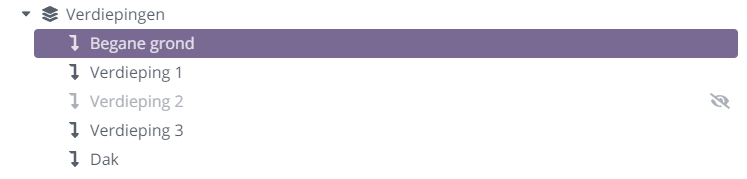
<li class="">Modified <code>Configurable-Editor</code> that does justice to the new style export where Levels / Floors are given a more prominent role.<!-- -->
<ul>
<li class="">The names of floors are customisable or adjustable.</li>
<li class="">Revit properties are readable as read-only properties for control.</li>
</ul>
</li>
</ul>
<p><img decoding="async" loading="lazy" alt="Floors" src="https://support-test.innobrix.net/en/assets/images/Levels-9df393e15dfb66d1a65a39576ee46181.png" width="747" height="179" class="img_ev3q"></p>
<ul>
<li class="">Floor thickness is used as a (height) 'offset' value on a floor to avoid looking at a ceiling or floor when a
floor is chosen in the <code>Floor changer</code>.</li>
<li class="">The <code>Floor changer</code> has received a modification that makes it possible to both 'drag' the changer and select a specific floor
by clicking on it.</li>
<li class="">A new <code>Filter</code> system is present that allows filtering on a column basis. It is now possible to provide <code>Columns</code> with
their own <code>Label</code>. In can be done via the <code>Scene Hierarchy</code> and choosing a <code>Column</code> and finally entering a term in the <code>Label</code> field.</li>
<li class="">Option list (objects) in the <code>Content Browser</code> have now been given their own colourful icon based on the name of an option list to give a more
visual distinction compared to the old generic 'Innobrix icons'.<!-- -->
<ul>
<li class="">It is additionally possible to upload your own thumbnail for an option list.</li>
</ul>
</li>
<li class="">Radio button adjustment: now, if not set by itself, an initial radio button is always turned on under a header. In principle, it is not possible or
desirable to have a header with several radios with none of them enabled. (There are exceptions, of course).</li>
<li class="">Option lists can now also be deleted under the <code>Actions</code> menu, but only when the relevant option list is no longer in use.</li>
<li class="">The Revit JSON configuration file has been modified so that the new style is also applied when importing.</li>
<li class="">The price list is <em>optional</em> created in <code>Plan Configurator</code> projects. (All plans within a project can show prices, or none).</li>
<li class="">3 new map layers have been made available in the <code>Planconfigurator</code>, these are:<!-- -->
<ul>
<li class=""><em>Spatial plans</em></li>
<li class=""><em>High voltage cables</em></li>
<li class=""><em>Natura2000</em></li>
</ul>
</li>
<li class="">All <code>Editors</code> (Configurable-Editor, Plan-Editor, Housing Type-Editor) can be locked with the <svg stroke="currentColor" fill="currentColor" stroke-width="0" viewBox="0 0 576 512" height="1em" width="1em" xmlns="http://www.w3.org/2000/svg"><path d="M423.5 0C339.5.3 272 69.5 272 153.5V224H48c-26.5 0-48 21.5-48 48v192c0 26.5 21.5 48 48 48h352c26.5 0 48-21.5 48-48V272c0-26.5-21.5-48-48-48h-48v-71.1c0-39.6 31.7-72.5 71.3-72.9 40-.4 72.7 32.1 72.7 72v80c0 13.3 10.7 24 24 24h32c13.3 0 24-10.7 24-24v-80C576 68 507.5-.3 423.5 0z"></path></svg> icon at the top of the top bar. As long as the lock is active, no changes can be made
made to the plan.</li>
<li class="">Improved <code>VolgJeWoning</code> integration:<!-- -->
<ul>
<li class="">Autosave saves directly to the active current 'configuration'.</li>
<li class="">Deeplinking to a specific option within the option list in Innobrix.</li>
<li class="">It is now possible to delete saved <code>Configurations</code> from within Innobrix Studio.</li>
</ul>
</li>
<li class="">White (loading) masses can now be updated (based on a configuration) with the correct dimensions.</li>
</ul>
<p>...And a whole bunch of fixes and minor improvements! 😊</p>]]></content>
        <author>
            <name>Paul Dijkstra</name>
            <uri>https://innobrix.net</uri>
        </author>
        <category label="updates" term="updates"/>
    </entry>
</feed>